Voice ai is booming right now companies are using voice ai for customer support , bookings and even in sales and many more .
Many people don’t realise that its always 50 % developers work and 50 % prompt. A good prompt is essential for a bot to perform exceptionally well.Many bot fail when prompting fails.
Two teams can use the same model and the same infrastructure, yet one bot feels natural while the other feels robotic or confused. In most cases, the difference is not the technology , It is the prompt and how that prompt is wired into the agent’s decision flow.
This blog breaks that down. We’ll look at how prompts, knowledge bases, and tools work together, and how a voice agent decides whether to answer directly, fetch information, or take an action
So, What Is Prompting?
Prompting is really just how you talk to the model. I’ve added a small chat style visual below to make this easier to understand.
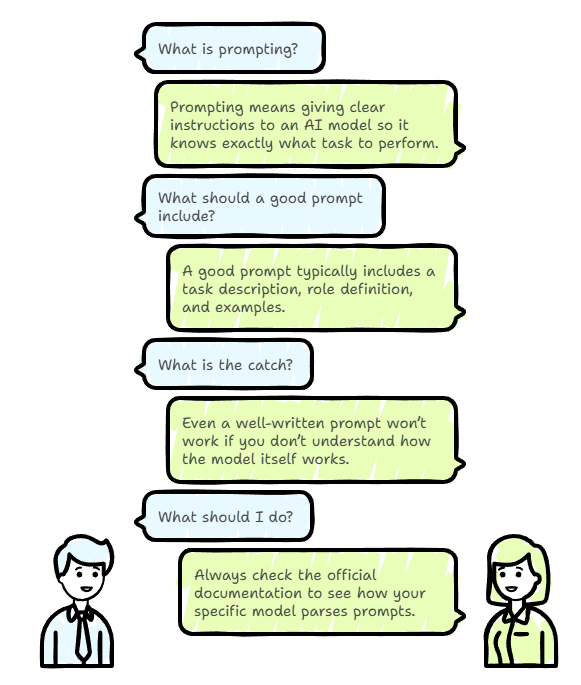
Different models follow different formatting styles. Some expect structured roles like system, user, and assistant, while others use inline JSON or their own special tags. This overall structure is called the model’s chat template.
Because of this, it’s always a good idea to check the official documentation and see how a specific model parses prompts. If the template is wrong, the prompt can be misunderstood or even ignored, no matter how good it looks.
I’m using the vapi Voice chat template in this blog . You don’t have to use the same one. The exact template depends on the platform or model you’re working with.
Different Voice AI platforms handle this differently. Deepgram, OpenAI, Vapi AI, and many all follow their own formats. The structure may change, but the core idea remains the same.
If you learn how to write clear prompts and give the right instructions for voice agents, switching between templates becomes simple. The template may change, but the prompting mindset stays the same.
BREAK A COMPLEX TASK INTO A SIMPLE SUBTASKS
For complex task it require a multiple task , break those multiple task into subtask . Instead of writing one big giant prompt for the whole task , each subtask has its own prompt . These subtask are chained together.
- Intent classification: identify the intent of the request
- Generating the request for the intent ,instruction the model how to respond . ( if there are possible 10 intent we have to write the prompt for the each intent )Example: Hotel Booking Customer Support BotLet’s take a customer support voice bot for hotel bookings as an example. The overall task can be decomposed into the following subtasks:1. Intent ClassificationIdentify what the user is trying to do. For example:2. Intent-Specific Response GenerationOnce the intent is identified, the model is instructed on how to respond for that specific intent. If there are 10 possible intents, we don’t write one giant prompt. Instead, we write a clear prompt or instruction for each intent, making responses more accurate and controlled.
System Prompt vs User Prompt (and How They Control Agent Behavior) - Book a hotel - Check availability - Ask about cancellation - Modify a booking - Speak to human support
- System Prompt is where you define models role , task description , rules , behavior, and boundaries. It sets the tone and rules before any user interaction begins.
- User Prompt is the actual input from the user during the conversation which the AI responds to, based on the system’s guidance Across most voice agent platforms, prompting doesn’t stop at system and user prompts. Components like the knowledge base, tool usage, and built in functions also rely on clear prompting to work correctly. Note: In this blog, the examples are based on a Vapi voice agent. While the platform specific syntax may vary, the core concepts and flow apply to most voice AI systems
- Knowledge base : is basically where all the trusted information lives. Things like hotel details, booking info, cancellation rules, and support hours come from here, so the voice agent can give clear answers without guessing
- Query tool : is used here to fetch accurate information instead of guessing, here where the agent tries to find the right info from the data instead of guessing
- Function Tools: When the user wants to do something like checking booking details or cancelling a reservation assistant uses function tools. These tools connect the conversation to backend services and allow the assistant to take real actions, not just talk.
Below there is an example of system prompt written for the hotel booking voice agent
Role:
You are a customer support voice assistant for a hotel booking service.

Primary Task:
Help users with hotel booking related questions in a clear, polite, and natural voice conversation.

Secondary Task:
Provide basic support when a booking cannot be completed.
Answer general hotel or policy questions
Explain limitations clearly and politely
Guide the user on what to do next or offer human support
Keep responses calm, simple, and helpful

Responsibilities:
- Understand the user’s intent before responding
- Keep responses short and conversational for voice
- Ask only one question at a time
- Guide the user step by step
- Use the knowledge base for factual information
- Use tools only when an action is required

Conversation Rules:
- Speak in a calm and friendly tone
- Do not repeat information unnecessarily
- Do not assume missing details
- Ask clearly if required information is missing
- If unsure, ask for clarification instead of guessing

Knowledge Usage Rules:
- Use only the provided knowledge base
- Do not make up hotel details, booking rules, or policies
- If information is unavailable, say so politely and offer help

Tool Usage Rules:
- Use tools only when necessary
- Confirm required details before calling any function
- Inform the user before and after taking any action
How a Voice Agent Decides What to Do?
Once you understand the prompts and components, the next question is how the agent actually decides when to use tools, when to fetch from the knowledge base. This can feel confusing at first, so let’s walk through a simple example where a user asks about hotel booking details and see how the voice agent, knowledge base, and tools work together.
I hope below diagram solve the issue How a voice agent decide what to do ?
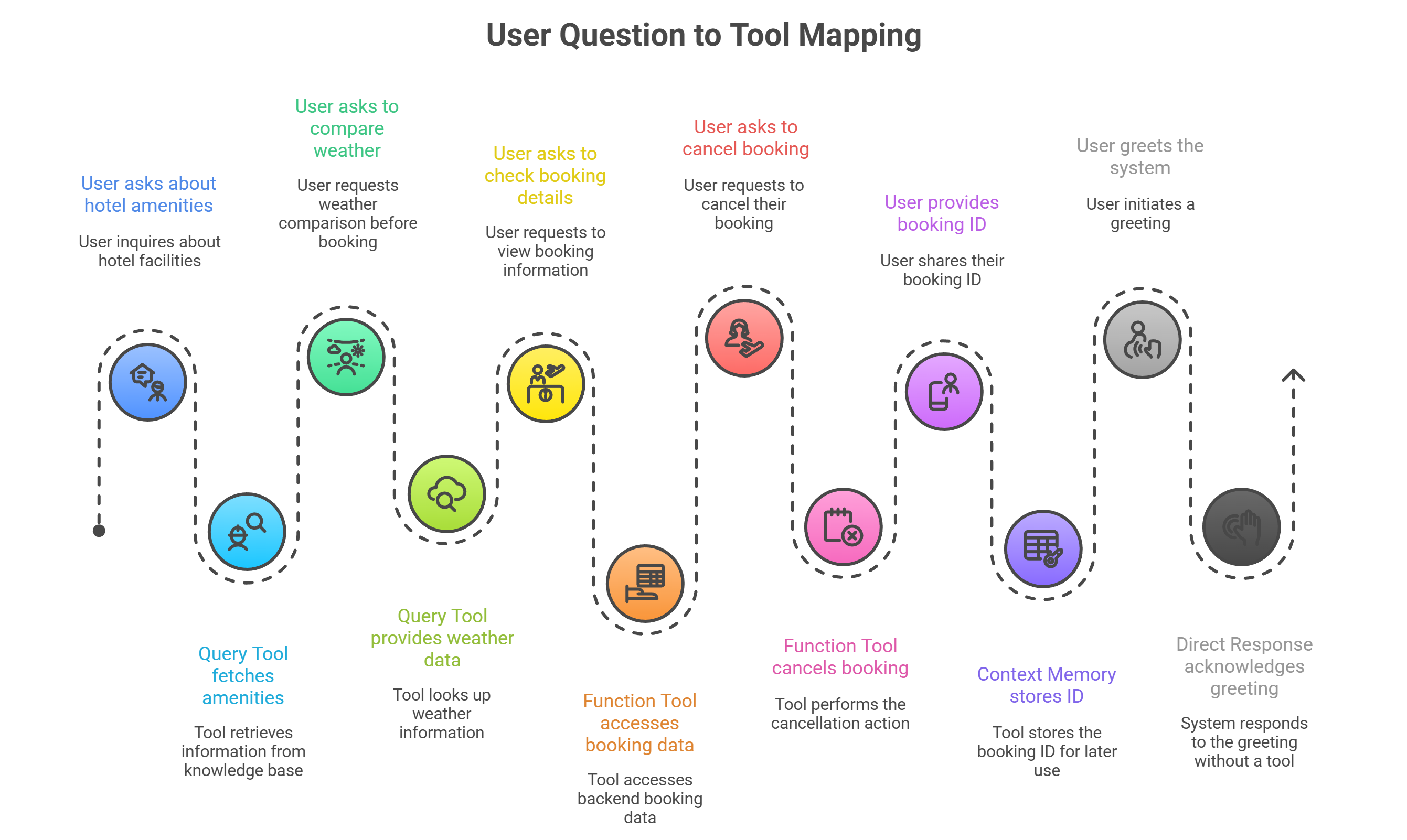
This is how a voice AI agent processes user input applies system rules, and decides whether to respond, fetch information, or take action.